General Questions
Does iTRAVEL eSIM work on all mobile phones?
iTRAVEL eSIM works on network unlocked devices compatible with eSIM
Is my mobile eSIM compatible?
You can check by dialing *#06#. If your device is eSIM compatible, your device's eSIM unique identification number EID will appear.
How do I know if my mobile device is Network Unlocked?
Go to Settings > General > About > Carrier Lock. If you see “No SIM restrictions” then your phone is network unlocked. If you don’t see this message, reach out to our support team here.
Can I install one iTRAVEL eSIM on several devices?
A single iTRAVEL eSIM can only be installed on one device at a time, and in most cases, it can only be installed once. Unfortunately, one eSIM cannot work on multiple devices.
What happens to unused data?
The unused data expires after the validity ends and cannot be used.
- The unused data expires after the validity ends and cannot be used.
Can I use my iTRAVEL eSIM for a personal hotspot or tethering?
Yes, you can use your iTRAVEL eSIM’s internet data on other devices by creating a personal hotspot.
- On iOS, Go to the “Personal Hotspot” menu under settings.
- On Android, Go to “WiFi hotspot” under settings.
How do I check which iTRAVEL eSIM is being used for my data?
- For iOS, Go to Settings > Cellular or Mobile > Cellular Data. You’ll see “On” next to the name of the iTRAVEL eSIM being used.
- For Android, Go to Settings > Network & Internet > Mobile Network. The name of the iTRAVEL eSIM which you had setup during installation will show.
- For Samsung, Go to Settings > Connections > SIM Card Manager. The name of the iTRAVEL eSIM being used will appear under preferred SIM card.
How to find my eSIM unique ICCID?
You might find yourself in a necessary situation to identify the unique ICCID associated with your iTRAVEL eSIM. If so, please go through the steps below.
For iOS
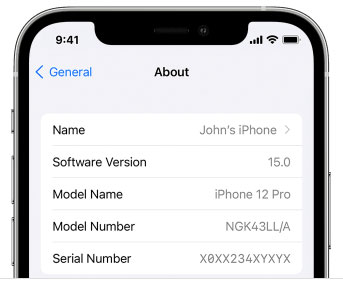
- Go to Settings General and tap About.
- Scroll down to find the ICCID. You will notice your primary ICCID and then your eSIM ICCID sat under the eSIM profile name.
For Android
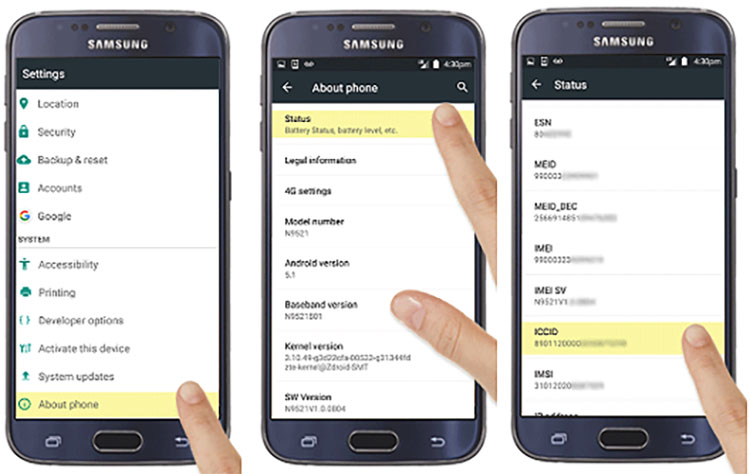
- Go to Settings About phone and tap SIM Status.
- Scroll to the ICCID on the display.